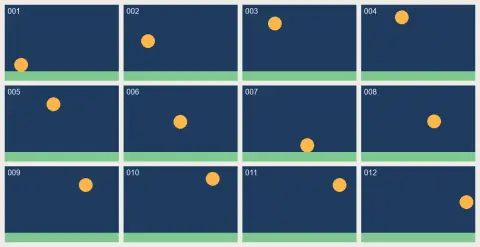
GIF to JPG examples.


First frame as JPG
GIF to JPG features.
Pick the frames you want
Each frame is shown as a thumbnail with its number and delay. Only the first frame is selected to start. Click others, or use All, First or Every 2nd.
One JPG or a ZIP
One selected frame downloads as a JPG. Several frames download as a ZIP of JPGs.
Complete frames
Each frame is rebuilt as the browser shows it, so you get the full picture, not just the changed part.
GIF to JPG, step by step.
01
Add your GIF
Choose or drop one GIF. This page works with one at a time.
02
Select frames
The first frame is selected. Click more thumbnails or use All and Every 2nd.
03
Download
Save a JPG, or a ZIP if you picked more than one frame.
GIF to JPG use cases.
- A still from a reaction GIF
- Save the best frame as a normal photo.
- Upload to a site that rejects GIF
- Many forms and profiles accept JPG but not GIF.
- Thumbnails and previews
- Make a still cover image for an animation.
GIF to JPG: best photos and fixes.
Which frame should you pick?
The first frame is often a blank or a half-drawn picture. Scan the thumbnails and choose the one where the subject is sharp and the motion has paused. Frames where nothing is blurred make the cleanest stills.
Why GIF stills look rough
GIFs use at most 256 colors per frame, so gradients can show banding. Saving as JPG keeps what the GIF had. It cannot add color back, so a GIF that looks poor gives a JPG that looks the same.
Why frames come out complete
GIFs often store only the part of the picture that changes. Saving those parts alone would give you fragments. This tool puts the full picture back for each frame before saving it.
Transparent areas
JPG has no transparency, so any transparent part of a GIF turns white. If the background must stay clear, use the GIF frame extractor, which saves PNG files.
Long GIFs
Up to 1000 frames are read from a GIF. Use Every 2nd to cut the number of files, or pick a few by hand. A ZIP of hundreds of frames can be large.
Smaller files from the JPG
A JPG of a GIF frame is often smaller than a PNG of the same frame, which helps with upload limits. If you need it smaller still, send it through the JPG compressor.
GIF to JPG FAQ.
How do I convert a GIF to a JPG?
Add the GIF, leave the first frame selected and download the JPG.
Can I save all frames?
Yes. Press All and download the ZIP of JPGs.
Will the JPG be animated?
No. JPG is a still format, so each frame is its own picture.
Why are transparent parts white?
JPG cannot hold transparency, so those areas become white.
Can I convert several GIFs at once?
No, one GIF at a time on this page. The phone QR upload is not offered here either, as a phone would send a still image.
Is it free?
Yes. It is free, needs no sign-in and the photo never leaves your device.